 Quiddo



 Quiddo
Aussie-made chores and pocket money tracker.
No card for the kids to lose,
just the family bank.
Kids track what they earn, spend and save. You keep control of the money.


“The app is easy to use, seamless to manage on their devices, and has my kids competing to finish their chores!”
What is Quiddo?
We built Quiddo because, with four kids, it was becoming a nightmare keeping track of who had what left over from birthdays, and which kid had already blown their last five bucks. We tried a spreadsheet. It lasted about a fortnight, because nobody has time to hunt down the right tab and fix broken formulas every week.
Quiddo is a simple tracker. Kids earn a balance through tasks and weekly pocket money, and you can split that balance into buckets like Spending, Savings and Giving. When they want to buy something, you pay on your card and log it as a spend. They can see their buckets and savings goals on their device or yours.
You hold the money the whole time, the Bank of Mum and Dad in all but name. Your kids see their balance and goals update in real time, and watching the number change is what makes it feel real. No bank account needed, and there's no minimum age.
Works in dollars or whatever currency your family likes to use. One plan covers unlimited kids.
Quiddo in 75 seconds
Amara reckons Dad owes her ten dollars. Let's see if she's right.
Want to click through it yourself? Try the interactive demo.
Not every job is worth a dollar
Most pocket money apps just move money around. Quiddo tells the difference between the jobs kids get paid for and the ones they simply have to do, so pocket money means something.

Tasks that earn
Wash the car, rake the leaves, help with the little ones. Attach a dollar value, and when the job is done and approved, their balance goes up. Kids see the reward for the effort straight away.
Jobs that just have to get done
Making the bed, feeding the cat, homework. These do not pay extra, but Quiddo holds back the weekly pocket money until enough of them are ticked off. You set the threshold, or release a percentage based on how many got done.
The result: kids learn that some things you do because they are yours to do, and some things you do to get ahead. That lesson is the whole point.
Money kids can see,
and a view that is theirs
Most trackers give kids one number and leave it there. Quiddo splits their money into buckets they can watch, and gives older kids a screen of their own to check.

Money split before it is spent
Each kid's money can flow into buckets like Spending, Savings and Giving. Pocket money splits across them the day it lands, so some is set aside before anyone thinks about spending it. Kids learn to divide money, not just count it.
A view that is theirs
Older kids get their own login on their own device, in their own colour. They watch their balance climb, check what is left on a goal, and see which tasks still need doing. It gives them a reason to keep at it without you chasing.
A pocket money app with no bank account or card
Quiddo is not a bank and not a prepaid card. There's no kids' debit card to activate, no account to open and no monthly card fee. Your child's pocket money lives as a virtual balance you both manage in the app, and you pay for what they buy on your own card once they've saved enough.
The card-based pocket money apps cost roughly $60 to $168 a year in membership, before card replacement and conversion fees. Quiddo is $1.99 a month with a 14-day free trial, and because there's no card, there's nothing to lose, replace or top up.
Your family's data stays yours. We never sell it or build profiles on your kids.
See it in action
Real screens from the Quiddo app. Tap any one to take a closer look.
Out now on iPhone and Android.
Why families use Quiddo
The chores get done, and the pocket money looks after itself.
Responsibilities vs tasks
Some jobs kids just have to do. Others they get paid for. Quiddo tracks both, and holds the weekly allowance until the basics are ticked off.
Task approvals
Kids finish a task and it lands in your queue. Give it the tick and their balance goes up straight away.
Money buckets
Split each kid's money into buckets like Spending, Savings and Giving. Pocket money can flow into them automatically, so money is earmarked before it's spent.
Savings goals
Pick a goal and track what's left. Kids can see exactly how many more tasks it'll take to get there.
Auto pocket money
Set a day and an amount once, and every week Quiddo drops it into each kid's balance for you.
No cash necessary
No cash needs to change hands. Kids build up a digital balance, and you settle purchases on your own card when they're ready to spend.
Unlimited kids
One kid or ten, it's the same price. Add as many children as your family needs.
How to get started
Takes about five minutes.
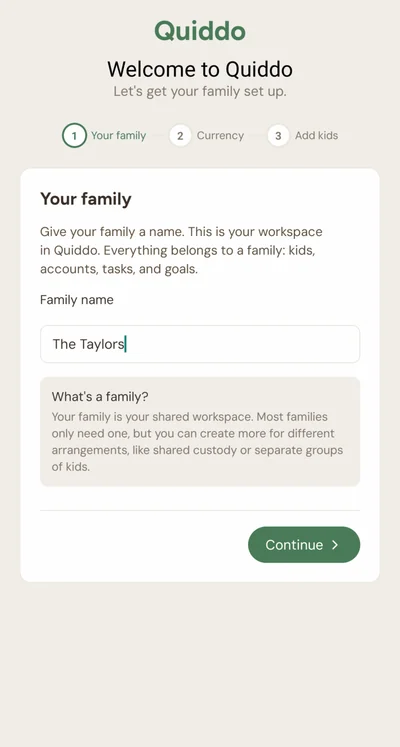
Create your family
Sign up and name your family workspace, then add each kid. Everything in Quiddo belongs to a family, and it takes a couple of taps to set up.
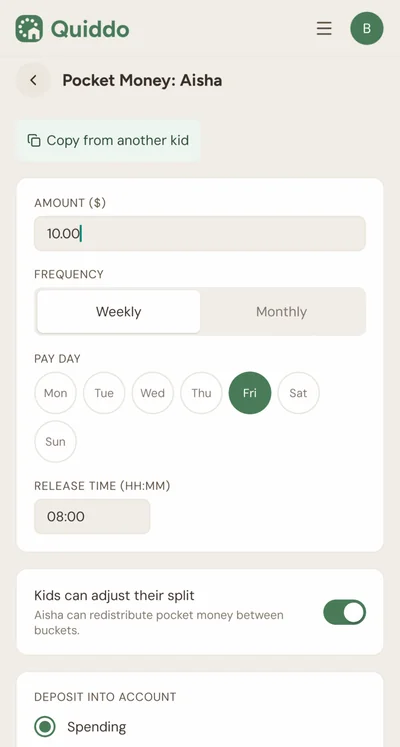
Set up pocket money
Pick an amount and a pay day, and Quiddo handles the rest. The same amount drops into each kid's balance every week without you doing anything.
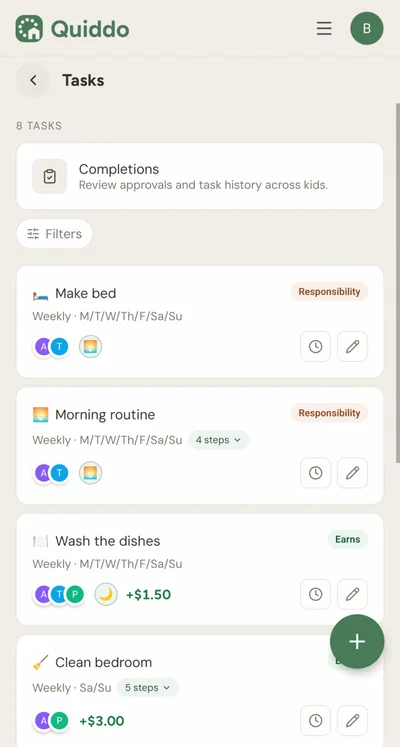
Add tasks
Set paid tasks with a dollar value kids earn on your approval, and responsibilities they simply have to do. Quiddo holds back the weekly pocket money until enough responsibilities are ticked off.
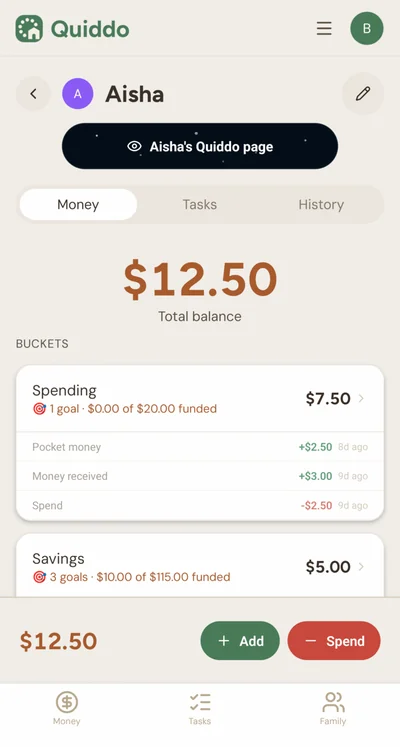
They save, you pay
When a kid wants to buy something, you pay on your card and log it in the app. They watch their balance and savings buckets on their device or yours.
What you get
Included in every plan
- Unlimited child profiles per family
- Virtual balance for each child, split into Spending, Savings and Giving buckets
- Automatic pocket money splitting across buckets
- Recurring and one-off tasks
- Task approval workflow
- Complete history of task completion (or task procrastination)
- Savings goals with progress tracking
- Responsibilities vs paid tasks split
- Custom family currency name
- Works on iOS and Android
- Made in Australia for Aussie families
How to get started
- Sign up with your email and get going in minutes
- Set up your family name and currency type
- Add your children and their weekly pocket money amounts
- Create your first task and watch it go
- Download the app for iOS or Android
- Invite your partner or co-parent to join
- Set older kids up on their own devices to see their balances and tasks
Simple pricing
Priced per family, not per child, with unlimited kids on every plan.
Everything included on both plans
All plans include a 14-day free trial. Cancel any time.
Why isn't it free?
Charging a little keeps Quiddo paying its own way, so we can keep improving it for families instead of chasing ads or selling data. At $15 for the whole year it works out to less than a fortnight of pocket money for one kid, and it covers every child in the family. There's a 14-day free trial too, so you can try the whole thing before you pay a cent.
Quiddo is built by Ben and Erica, a Melbourne couple with four kids. Ben is a software engineer and Erica is a teacher with experience teaching financial literacy. Meet the team.
What families are saying
Real parents, real pocket money routines.
Using Quiddo was a simple choice for me in my small, coparented family. I have been trying to find a way to give my children the freedom to learn and manage their financial literacy in a formative way. Quiddo lets my children understand that responsibility is a part of life that often goes unrewarded, but allows me to recognise them for extra effort and jobs they do. The app is easy to use, seamless to manage on their devices, and has my kids competing to finish their chores! Ben has been receptive to feedback and the customer experience has been fantastic!